150 Series (Software)
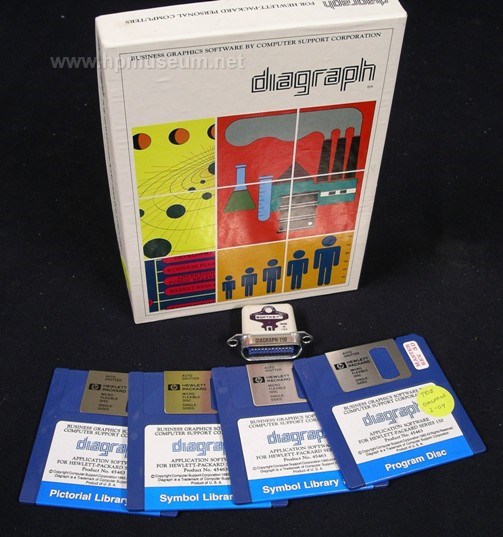
|
| Application Software |
| Name: Diagraph and Picture Perfect for 150 |
| Associated Hardware: 150 |
| Introduced: 1983 |
| Product Number: 45463 |
| Media: 3.5 inch SS/DD |
| Original Price: $690 |
| Division: Personal Software |
| Teledisk: 2.16 |
Description:
High-end graphics package for the Touchscreen. Picture Perfect includes pie, bar and line charts. Diagraph is a clip-art graphics program.
Special archive notes:
This zip file contains eight discs:
PICLIB1: Diagraph Pictorial Library 1
SYMLIB1: Diagraph Symbol Library 1,
SYMLIB2: Diagraph Symbol Library 2,
DIAGPROG: Diagraph Program Disc,
PPDEMO: Picture Perfect Demo,
HORBRCHT: Picture Perfect Horizontal Bar Charts,
LINECHT: Picture Perfect Line Charts,
VERBRCHT: Picture Perfect Vertical Bar Charts.
These programs cannot be run without the hardware protection "dongle" that plugs into the HP-IB port. These dongles can be made using the connector end of an HP-IB cable, 2 diodes and a push button switch. Start by removing the connector end of the HP-IB cable from the cable itself (we used a hacksaw).
Instructions for making the Diagraph dongle:
(1) connect the CATHODE end of diode1 to pin 15 (DIO7) of the 24-pin connector.
(2) connect the CATHODE end of diode2 to pin 1 (DIO1) of the 24-pin connector.
(3) connect the ANODE ends of both diodes together.
(4) connect the ANODES in step 3 to one side of the pushbutton.
(5) connect the remaining side of the PB to pin 10 (SRQ) of the 24-pin connector.
Instructions for making the Picture Perfect dongle:
(1) connect the CATHODE end of diode1 to pin 14 (DIO6) of the 24-pin connector.
(2) connect the CATHODE end of diode2 to pin 3 (DIO3) of the 24-pin connector.
(3) connect the ANODE ends of both diodes together.
(4) connect the ANODES in step 3 to one side of the pushbutton.
(5) connect the remaining side of the PB to pin 10 (SRQ) of the 24-pin connector.
Click on "More Images" below to see a pin out configuration for the HP-IB connector and to see a photo of the finished product.
| Back |