Technical Desktops
 | 80 Series Selection: |
| 1) 85 (1980) | |
| 2) 9915 (1980) | |
| 3) 83 (1981) | |
| 4) 86 (1982) | |
| 5) 87 (1982) | |
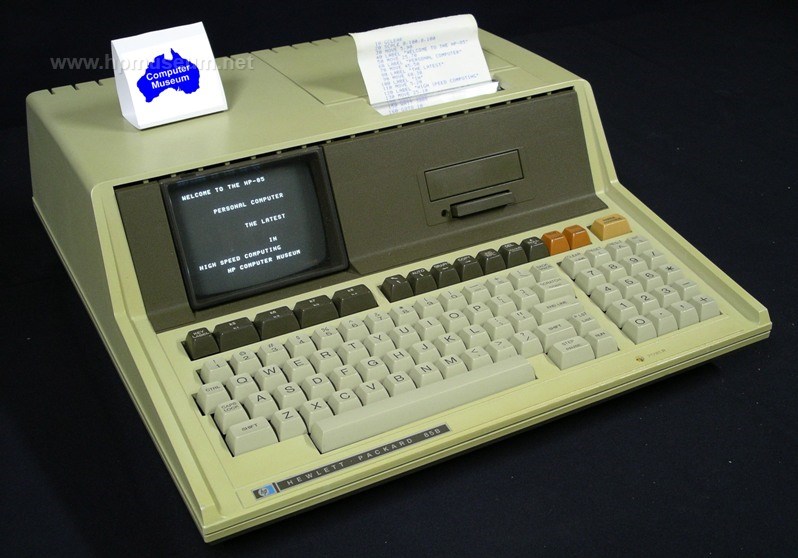
HP introduced the 80 Series in 1979, beginning with the 85. The 80 Series was developed in Corvallis, Oregon, which at the end of the 1970s had the charter for all HP calculator products. The machines in the 80 Series were the first desktop computers produced in Corvallis. The 80 Series was HP's first truly low-end technical computer range. The 85 cost less than half the price of the 9825. Like the 98X5 computers and their predecessors, the 80 Series employed pluggable ROM modules to add product capability (I/O connections, language enhancements, etc). Subsequent computers from HP would have these enhancements either built-in or handled by software. All 80 Series computers came standard with ROM-based BASIC, and only the 9915 had a cooling fan. For more information on the Series 80, be sure to see the Key Notes newsletters. Collector's Notes: More so than any other HP computers, the 80 Series machines are subject to UV fading. Almost all of these computers have faded somewhat and most have experienced moderate to severe fading. Of course, the colour of the computer's case does not affect functionality. But, if cosmetics matters to you, this problem can be quickly fixed with a respray. It only takes about twenty minutes to disassemble, mask, spray and reassemble one of these computers (not including the time required to clean the case or to let the paint dry). The result is dramatic with most machines looking almost brand new after being sprayed. The key caps are very robust and show almost no sign of fading or wear regardless of age. Matching the original colour is an interesting challenge. Just knowing what the original colour was is a challenge, since almost no surviving units have not faded. The museum has an HP-85 that has been kept in a hard-shell case for its entire life. While most units have an ivory/almond/beige appearance, this unit also has a slight green tinge to it. The best colour match that we have found locally comes from the Taubman's brand White Knight. The White Knight Sandbank colour produces an outstanding final finish. A 300 gram can will comfortably cover two and a half computers. For a more authentic restoration of the plastic, you may want to try Retr0bright to bleach the plastic back to its original color.
| |
| Back | Product Documentation | Category Accessories |
^ TOP©2004 - 2024 BGImages Australia - All Rights Reserved.
The HP Computer Museum and BGImages Australia are not affiliated with HP Inc. or with Hewlett Packard Enterprise. Hewlett Packard and the HP logo are trademarks of HP Inc and Hewlett Packard Enterprise. This website is intended solely for research and education purposes.